Architecture overview
All paths below point into the public template repo: CodeBlock.DevKit.SaaS.Template (main branch).
This page ties together three ideas: Clean Architecture as the overall design, the Solution layout under src, and how use cases and domain modeling (DDD) appear in code.
Clean Architecture
The SaaS template follows Clean Architecture: business rules sit at the center, and outer layers depend inward—not the other way around. Domain and application behavior stay independent of UI, databases, and frameworks, so you can change storage or hosts without rewriting your core logic.
At a system level, think of it like this: clients (website, admin, API) are thin shells. They depend on application services—stable, feature-oriented facades (for example IDemoThingService). Each application service orchestrates one or more use cases by building MediatR-style requests and sending them through the DevKit request dispatcher. Use case handlers then run the real workflow: they work with domain objects and repository abstractions, while infrastructure supplies the concrete implementations.
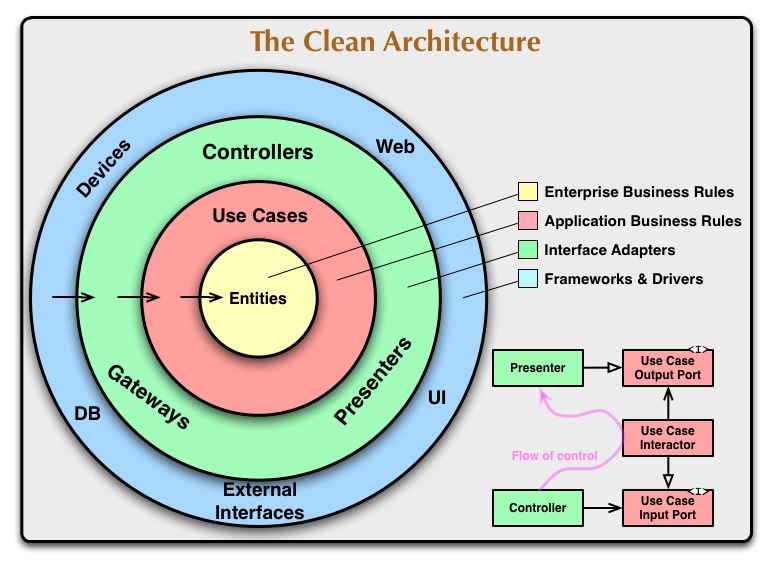
In this template, Core maps to the inner policy, Application to services plus use cases, Infrastructure to gateways (data, integrations), and 2-Clients to the delivery mechanisms.
Solution structure
The repository groups projects so the dependency direction stays obvious. The screenshot below is the CanBeYours solution as seen in your IDE; your renamed template will look the same apart from the solution name.
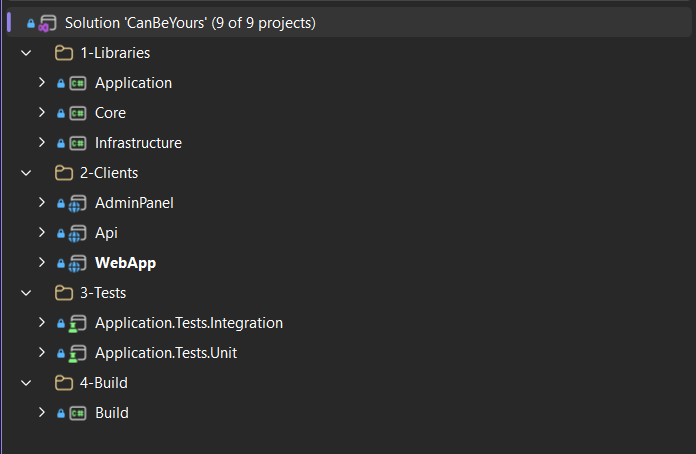
Solution layout under src: libraries, clients, tests, and build automation.
| Area | Folder / projects | Role |
|---|---|---|
| Libraries | src/1-Libraries/Core, Application, Infrastructure |
Core — domain model and contracts. Application — application services (Services/), use cases (UseCases/), DTOs, and related helpers. Infrastructure — persistence (for example MongoDB), mappings, migrations, repository implementations. |
| Clients | WebApp, AdminPanel, Api |
Executable apps: public site, operator admin UI, and HTTP API. They call application service interfaces (not use case handlers directly) and wire implementations through dependency injection. |
| Tests | Application.Tests.Unit, Application.Tests.Integration |
Automated tests focused on application behavior; integration tests exercise the stack closer to production wiring. |
| Build | src/4-Build |
Build and packaging helpers used by your pipeline (see CI / CD). |
Numbered folders (1- … 4-) are a deliberate ordering hint: libraries first, then entry points, then tests and build.
Application layer: services and use cases
The Application project splits what the UI/API calls from how each operation is executed.
Application services
Application services live under Application/Services/ (for example DemoThingService.cs). They expose a small, intention-revealing interface (for example IDemoThingService) that Blazor pages, API controllers, and similar entry points inject.
Responsibilities:
- Accept DTOs and simple parameters that make sense at the boundary.
- Map those inputs into use case requests (command/query objects).
- Orchestrate use cases by calling
IRequestDispatcher(SendCommand/SendQueryfrom the DevKit), which dispatches to the matching use case handler. - Return
Result<T>(or equivalent) so clients get a consistent success/error contract without knowing MediatR types.
The service stays thin: no domain rules belong here—those belong in entities, policies, and use case handlers.
Use cases (handlers)
Features are still organized around use cases—one coherent operation the system performs (for example create, update, get, or search a resource). Each use case typically has:
- A request object (input for the handler).
- A handler class that runs the scenario: load or construct domain objects, enforce rules, call repository interfaces from Core, publish domain events through the DevKit pipeline.
Commands and queries follow a CQRS-style split (BaseCommandHandler, BaseQueryHandler, MediatR IRequestHandler<,>), so reads and writes stay clear and testable.
flowchart LR
  subgraph clients["Clients (WebApp / Admin / API)"]
    EP[Endpoints / UI]
  end
  subgraph app["Application"]
    DTO[DTO / input]
    ASVC[Application service]
    REQ[Use case request]
    UC[Use case handler]
  end
  subgraph core["Core"]
    DOM[Domain entity]
    REPO[Repository interface]
  end
  subgraph infra["Infrastructure"]
    IMPL[Repository implementation]
  end
  EP --> DTO
  DTO --> ASVC
  ASVC --> REQ
  REQ --> UC
  UC --> DOM
  UC --> REPO
  IMPL -.->|implements| REPO
The sample DemoThings area shows the full chain: IDemoThingService / DemoThingService in Application/Services/DemoThings/, and handlers under Application/UseCases/DemoThings/. Copy that shape when you add your own aggregates and operations.
Domain modeling (DDD) in Core
src/1-Libraries/Core holds the domain model using a DDD-oriented style aligned with CodeBlock DevKit:
- Aggregates (for example
DemoThingextendingAggregateRoot) encapsulate state and invariants; mutating methods live on the entity, not scattered in UI or controllers. - Factory-style creation and private setters keep construction and changes consistent; domain exceptions express rule violations in domain terms (see
DemoThingDomainExceptions.cs). - Domain events (for example in
DemoThingDomainEvents.cs) are raised from the aggregate when something meaningful happens; the application layer dispatches them for side effects (notifications, projections, integration, and so on). - Repository interfaces (for example
IDemoThingRepository) are defined next to the domain; concrete repositories and mapping live in Infrastructure (for exampleDemoThingRepository.cs,DemoThingMappingProfile.cs), satisfying the dependency rule.
If you already know DDD, this should feel familiar: Core is the bounded context’s heart; Application combines application services (the API your clients call) with use case handlers (the workflow); Infrastructure is where technical detail lives. The template’s DemoThings code is intentionally verbose in XML comments so you can treat it as a guided example while you replace it with your own domain language.